Baby Piano Games & Kids Music
- 4.3
- Rating
- 1.00M
- Installs
- Free
- Price

 Analysis by App-foxy
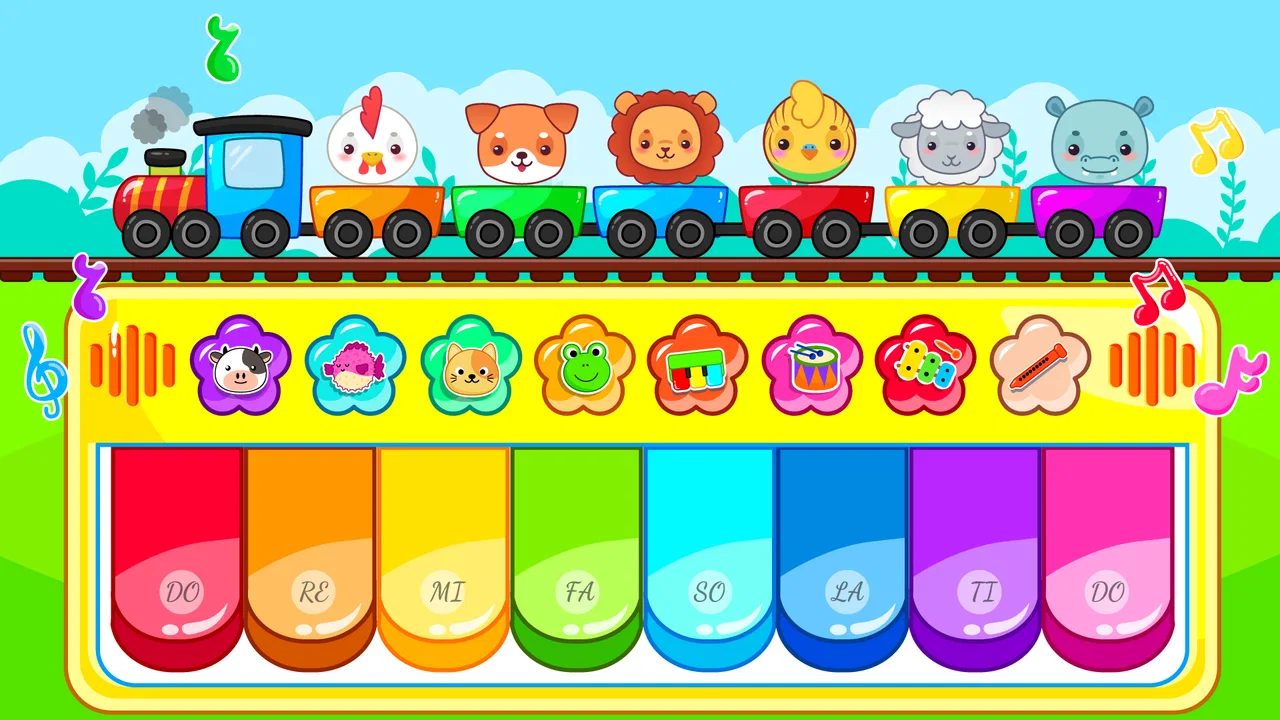
Baby Piano Games & Kids Music is the kind of mobile game I would open when I want a young child to explore sounds without turning the phone into a complicated lesson. It combines a simple piano-style play area with activities built around vehicles, letters, numbers, songs, rhymes, and animal sounds. That mix makes it feel more like a small collection of musical toys than a traditional game with levels to complete.
I reviewed it with a practical question in mind: is it easy for a child and an adult to use together, or does the setup become more frustrating than the play? My impression is positive, but with an important qualification. The app is at its best when an adult helps with the first few minutes, chooses one activity, and keeps the session short. It is less suitable if you want a structured music course, detailed progress tracking, or a completely hands-off experience.
Developed by GunjanApps Studios, this free music game has an Everyone age rating and supports devices running Android 7.0 or later. It has reached over a million installs and holds a 4.3 average from around 5.4 thousand ratings. Those figures suggest that it has found a clear audience, but they do not change the central question for me: whether its collection of child-friendly activities fits your particular routine.
You May Also Like

 Blood Strike: 2.5 Anniversary
Blood Strike’s Loadouts Turn Every Drop Into a Tactical Gamble
A close look at Blood Strike’s custom loadouts: how fast access to signature weapons reshapes its battle royale rhythm, rewards preparation, and narrows the gap between fights.

 Pandora - Music & Podcasts
Pandora’s Music Is Easy to Start, but Harder to Recover
Pandora’s strength is its low-effort path from a seed to a station. Its weak spot is how much confidence it asks you to place in connection, setup, and quiet recovery.

 8 Ball Pool
 Is Built on Rivalries, Rematches, and Routine
A close look at the rivalries, rematches, shared routines, and unanswered safety questions that turn a quick pool match into a persistent mobile community.

 Samsung Music
’s Quiet Strength Is Playing What You Already Own
Its reach comes less from spectacle than from dependable access to a personal library. That simplicity is both the app’s strongest retention engine and its ceiling.

 AccuWeather: Weather Radar
AccuWeather Review: A Quick, Clear Forecast for Everyday Decisions
For everyday plans, the best forecast is the one you can understand quickly. AccuWeather makes rain timing, radar, and local conditions easy to act on, with a few trade-offs.

 Hill Climb Racing
Why Hill Climb Racing Still Turns Crashes Into One More Run
A tiny car, a bumpy hill and one more upgrade: Hill Climb Racing keeps resurfacing because its simple chaos makes every near-miss feel personal.
More From Our News Desk



Getting past the first points of friction
The first place families can get stuck is not necessarily inside the game. A child may be eager to tap the piano, while the adult is still dealing with installation, device storage, sound settings, or an unfamiliar screen. Because this is aimed at very young players, even a small delay can make the opening feel unsuccessful. I recommend installing it before handing over the device, then checking that the device has enough free space and that its media volume is audible.
That last check sounds obvious, but it matters more in a music game than in a quiet puzzle. If the phone is muted, connected to a Bluetooth speaker in another room, or set to a very low media volume, the child may assume that tapping does nothing. I would test one piano key and one animal or song activity before inviting a child to play. This takes only a moment and avoids blaming the app for a device-level sound problem.
The app is free to download and use, while optional in-app purchases range from $0.99 to $6.99 per item. I would make that part of the setup conversation for any shared family device. A child-focused interface can encourage enthusiastic tapping, so an adult should handle purchasing controls and avoid leaving a child alone with a payment-confirmation screen. The important practical distinction is that you can try the experience without paying, but the wider app environment may still include optional paid items.
Another common sticking point is expecting every section to behave like the piano. The piano invites direct tapping and immediate sound, whereas songs, rhymes, alphabet activities, numbers, vehicles, and animal sounds may present information in different ways. I found it more useful to treat each area as a separate play prompt rather than searching for one consistent control scheme. When a child seems confused, I return to the piano first, demonstrate one tap, and then move to one themed activity.
A calmer first session
My preferred introduction is deliberately small. I would sit with the child, open the piano, play a few notes, and ask the child to copy a single sound or rhythm. After that, I would choose just one category, such as animals or vehicles, rather than opening every available option. This gives the child a clear goal and lets the adult see how the particular device responds to touches and sound.
This approach also reveals an important trade-off. The broad selection is a strength when a child loses interest quickly, but it can become visual noise if the child is not ready to make choices. A short guided sequence works better than presenting the whole collection at once. I would use the app as a shared activity at first, then gradually let the child choose the next sound once the controls are familiar.
If the screen appears slow, I would first close other demanding apps and restart the game. I would also check whether the device itself is responding slowly elsewhere. That is safer than repeatedly tapping the same control, because rapid tapping can make it difficult to tell whether the game missed an input or is still processing an earlier one. A few deliberate taps are more useful for testing than a burst of random touches.
Using the activities as a flexible routine
The strongest part of Baby Piano Games & Kids Music is its flexibility. It can fill a few quiet minutes in the morning, become a parent-and-child imitation game, or provide a simple sound activity during travel. I would not describe it as a complete early-learning program, but it can support small moments of listening, recognition, and turn-taking when used with an adult nearby.
For example, during a rainy afternoon, I might begin with the piano and play a slow pattern. Then I would ask the child to choose an animal sound and imitate it. From there, we could switch to numbers or letters, using the screen as a prompt rather than expecting the app to teach a full lesson. This workflow keeps the activity active and social. The child is not only pressing buttons; they are listening, waiting, copying, and choosing.
A less obvious benefit is that the different themes can support transitions. Vehicles may work well for a child who is fascinated by movement, while animal sounds can be an easier entry point for a child who is not yet interested in musical notes. Songs and rhymes can suit a child who prefers repetition. I would use the theme as the invitation, then bring the musical element back in through tapping or singing along.
Another useful tactic is to give the child a two-choice rule: “Would you like animals or numbers?” This reduces the decision burden without taking away control. If the child keeps switching immediately, I would set a simple boundary such as two minutes in one section before choosing another. That is not a feature of the game; it is a practical way to make a broad, colorful app easier to manage.
The current version is 32, which is useful to know when checking whether an installed copy is up to date. I would compare the version shown on the device with the current listing if something behaves unexpectedly, then restart the app after an update. I would not assume that an update alone will solve every issue, but keeping the installation current is a sensible first check before troubleshooting more deeply.
Recovering when play stops working smoothly
When a sound does not play, I use a simple recovery order. First, I tap one control once and listen. Next, I check media volume and any connected audio device. Then I leave the activity and return to it. If that fails, I close and reopen the game. This sequence separates a temporary screen problem from a wider audio or device problem without making the child wait through a complicated diagnosis.
If touch input seems unreliable, I test the same part of the screen in another app. A thick case, a screen protector, damp fingers, or a screen that is already struggling can all make taps feel inconsistent. I also avoid pressing several controls at once while testing. For a young child, overlapping taps are normal, but an adult troubleshooting the app should create a clean test so the result is meaningful.
When the game closes unexpectedly, I would restart the device and make sure other apps are not consuming the available memory. If the problem appears only after returning from another app, I would begin a fresh session rather than repeatedly switching back and forth. These are general, low-risk steps, but they are especially helpful here because a child may interpret a sudden interruption as part of the game and keep repeating the action that caused it.
I also recommend watching the child’s tapping style. Very forceful tapping, dragging across several controls, or holding a finger down can produce a different result from a single light tap. Demonstrating “tap, wait, listen” is both a troubleshooting technique and a small musical exercise. It turns a moment of frustration into a chance to practice attention and timing.
Separating app problems from device and environment problems
Not every disappointing session is caused by the game. A child who is tired may reject an activity that worked perfectly earlier. A noisy room can make animal sounds or songs difficult to hear. A phone with a dim display may be hard to use outdoors, while glare can make colorful controls less clear. I would change one environmental factor at a time before deciding that the app is unsuitable.
Sound is particularly easy to misread. The media volume can differ from ringtone volume, and a device can appear to be playing normally while sending audio to headphones or another speaker. I check the output route, disconnect accessories temporarily, and test the game with the device held at a comfortable distance. I would also avoid raising the volume too high for a child; clear and moderate is better than loud.
Performance can depend on the age and condition of the phone or tablet. Since the game supports Android 7.0 and later, compatibility with the operating system is only one part of the experience. Available storage, background processes, battery-saving behavior, and general device responsiveness can still affect how quickly a touch becomes a sound. If other apps are also sluggish, I would treat the device as the first suspect.
There is also a human factor. The store summary covers many themes, but a child may want a very specific kind of interaction, such as a full song, a realistic instrument, or a lesson that gets harder over time. This app is not the right choice for every musical goal. If your child wants to learn note names, follow sheet music, record performances, or build a measured practice routine, a dedicated instrument or music-learning app would be a better match.
It is also worth considering supervision and screen habits. The Everyone rating makes it suitable for a broad audience, but age suitability does not mean every child will use it well without guidance. Younger children may tap rapidly, switch sections constantly, or focus on the most stimulating sounds. I prefer short sessions with a clear stopping point, especially before bedtime, rather than leaving the app running as background entertainment.
How it compares with familiar alternatives
Compared with a physical toy piano, this game offers more variety in one place: letters, numbers, songs, rhymes, vehicles, and animal sounds can all be reached from the same screen. A physical instrument still wins for tactile feedback, shared play away from screens, and learning where notes are located in space. I would choose the app for portability and variety, but a real keyboard for deeper musical exploration.
Compared with ordinary nursery-video apps, this game encourages more direct participation. The child can tap, select, and respond rather than only watch. That does not automatically make it educational, but it gives an adult more opportunities to ask questions and turn the sounds into a conversation. If your priority is passive viewing, a video app may feel simpler; if you want interaction, this game has the stronger role.
Compared with a dedicated piano-learning app, it is much less demanding and therefore easier to introduce to a very young child. The same simplicity is its limitation. I would not use it as a replacement for lessons or as proof that a child is developing formal keyboard skills. Its value is in playful exposure, sound recognition, and shared experimentation.
The optional purchases are another point of comparison with completely free offline toys. Families who want a strictly purchase-free environment should review the device’s purchase protections before a child uses it. On the other hand, the free starting point makes it reasonable to test whether the themes and interaction style suit your child before spending anything.
Who will enjoy it, and who should skip it
I think this game is a good fit for parents who want a compact collection of musical and recognition activities for a young child. It is especially useful when you can sit nearby, demonstrate a control, and turn each section into a small conversation. Children who enjoy switching between animals, vehicles, numbers, and songs may appreciate the variety more than children who want one carefully structured game.
I would be more cautious if you need detailed parental controls, a formal learning path, or a reliable substitute for an instrument. I would also skip it for a child who becomes overstimulated by frequent sound changes or who needs a larger screen for accurate tapping. In those cases, a physical piano, a quieter focused activity, or a specialized learning tool may create a better experience.
For families sharing one device, I suggest creating a repeatable routine: check volume, open one activity, play together, and exit when the child starts switching without listening. This reduces setup friction and makes the game feel intentional. It also helps an adult notice whether the child is actually enjoying the music or simply reacting to bright choices and rapid sounds.
My final impression is that Baby Piano Games & Kids Music succeeds as a lightweight, varied sound playground. Its real strength is not formal piano teaching, but giving a child many small reasons to listen, tap, imitate, and choose. I like it most as a supervised activity that can adapt to a child’s mood, not as an app to hand over indefinitely.
For a free game from GunjanApps Studios, it offers a generous starting range of themes and a straightforward way to explore music on a compatible Android device. Just approach it with realistic expectations, prepare the sound and purchase settings first, and use the recovery steps above when a session goes wrong. If that matches what you need, Baby Piano Games & Kids Music is worth trying; if you want structured musical progress, I would put the money and attention toward a dedicated alternative instead.
FAQs for Baby Piano Games & Kids Music
01What age group is Baby Piano Games & Kids Music suitable for?
Baby Piano Games & Kids Music is designed for young children, typically ranging from toddlers to preschoolers. The app provides a safe and engaging environment for children around 1 to 5 years old. It offers colorful graphics and simple controls that are easy for little fingers to manage, encouraging early musical exploration.
02Does Baby Piano Games & Kids Music require internet access?
The app can be used without an internet connection, making it perfect for on-the-go entertainment. However, certain features, such as updates or extra downloadable content, may require internet access. Parents can feel assured that the core functionalities are available offline, providing uninterrupted playtime.
03Is Baby Piano Games & Kids Music safe for children?
Yes, Baby Piano Games & Kids Music prioritizes child safety by offering a kid-friendly interface and content. The app is free from inappropriate ads and in-app purchases, ensuring a secure experience. Parents can let their kids enjoy the musical activities without worrying about accidental navigation or unsuitable content.
04What educational benefits does Baby Piano Games & Kids Music offer?
The app promotes cognitive and motor skill development through musical interaction. Kids can learn about different musical notes, rhythms, and sounds, fostering an early appreciation for music. It also enhances hand-eye coordination and auditory skills, making it both educational and fun for young children.
05Are there any parental controls within Baby Piano Games & Kids Music?
Yes, the app includes parental control features to help manage your child's playtime. These controls allow parents to set time limits and monitor usage, ensuring a balanced approach to screen time. The app also provides settings to disable any external links, maintaining a safe environment for children.
Pros
- Engaging and colorful interface for kids.
- Wide variety of instruments to explore.
- Simple navigation for young users.
- Promotes creativity and musical skills.
- Interactive sound and visual effects.
Cons
- Limited free content
- requires purchases.
- Ads can disrupt gameplay experience.
- Some features need internet connection.
- Lacks advanced parental controls.
- Repetitive music might annoy parents.

Baby Piano Games & Kids Music
Gallery